Camera Operator had the opportunity to chat with A camera operator Chris Moseley and B camera/Ronin operator Chris Herr about their work on the Obi-Wan Kenobi Disney+ series and about bringing a new, more modern look to this story about familiar characters.
Camera Operator had the opportunity to chat with A camera operator Chris Moseley and B camera/Ronin operator Chris Herr about their work on the series and about bringing a new, more modern look to this story about familiar characters. We talked extensively about Industrial Light & Magic’s StageCraft technology and the LED Volume at its heart, which can conjure up fantastical worlds rendered on set in real time, and the new challenges and opportunities for camera operators that comes along with it. Also discussed was the unique shooting setup for the series that relied primarily on gimbals instead of Steadicam, working on a show that at times felt more like a movie than television, and the sheer childlike awe of seeing Darth Vader right in front of you.
This interview was recorded following the release of the third episode of Obi-Wan Kenobi.
Camera Operator: With its use on shows like The Mandalorian and The Book of Boba Fett, as well as in recent feature films like Matt Reeves’ The Batman and Thor: Love and Thunder, I think it’s probably safe to assume that a lot of people are at least broadly aware of Industrial Light & Magic’s StageCraft technology and the LED Volume at the heart of it. But for anyone not familiar, could you give a quick overview of what that technology is?
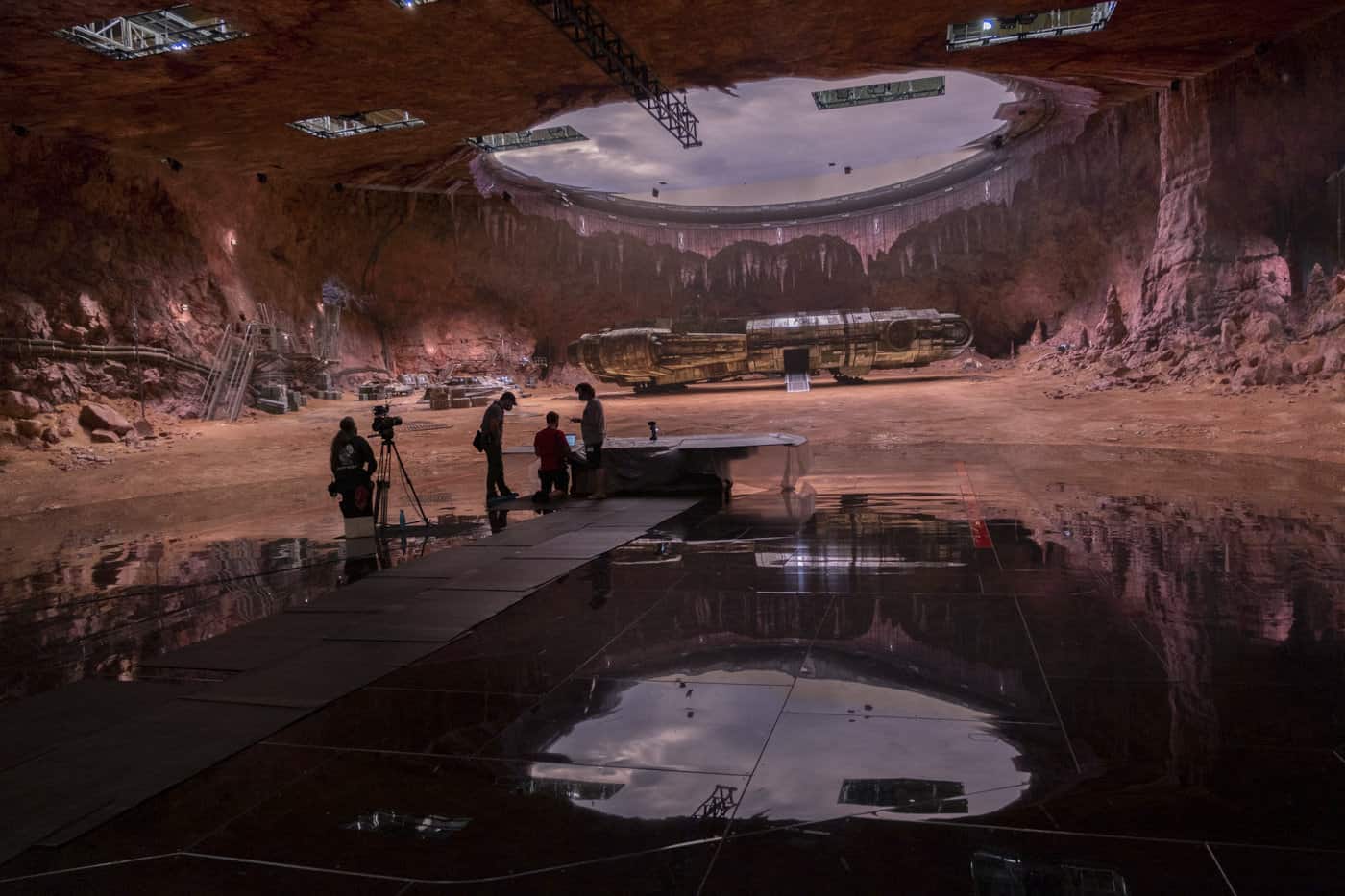
Chris Moseley: Basically, the Volume is a curved LED screen that wraps around the set. On it, you can load in any backdrop you want as well as elements like digital people that move, spaceships that fly by, interior or exterior sets with blinking lights, a sun, a planet, anything. It’s very realistic. On top of the screen, the Volume is surrounded by witness cameras that are connected to the camera we’re shooting. They track our camera as it moves within the environment, and the image on screen matches those movements so that the perspective is always correct. The benefits of it are great compared to just having a blue screen there. It really makes it easy to compose your shots because you can actually see what your background is going to be, and it helps the actors immensely because they’re able to react to the environment instead of looking at a blank screen. And photographically, all that light plays on the actors’ faces. That’s what makes it so realistic. Maybe Chris can get more into the technical aspects of it.
Chris Herr: I had all the nerdy conversations with many people. I mean, there are, like, 20 people that are just there for the tech side of it every day, just to keep the whole thing running smoothly. Those people are brilliant and are a wealth of information. Chris mentioned framing; the interesting difference between the Volume and blue screen is that if there’s an element like a moon in the sky, or another planet on the horizon, you can adjust your frame accordingly on that day as opposed to letting the VFX compositors compose your frame in post. So you’re the one making decisions on placing that moon or something in the sky in between two people or behind someone.
Moseley: You can actually see what’s going to be in frame instead of someone saying “there’s a big creature over there coming at the camera” without really knowing how big it is. So much of what we compose for are backgrounds—structures, people, even colors—and being able to see all that is incredibly helpful.
Herr: One thing I noticed is if you have 100 background actors in there—which can all fit in the room since it’s about 80 feet across, and you can really pack it in—and if you have, say, a ship flying in, then all 100 people are looking at the same object as opposed to shots where everyone’s supposed to be looking at the same thing, but the eyelines don’t all match up. I don’t know that everyone notices that, but I definitely pick up on that difference. On the technology side, what I think makes it so realistic is they have the world built in ILM’s StageCraft software. It’s fully built out in 3D space, and this 80-foot room exists within the 3D world, so that 80-foot space is our bounding box that we can move around in. Then they overlap the virtual camera with the position of the real camera and project that onto whatever field of view we’re seeing. The position of the camera within the Volume determines the the parallax, the compression, the perspective shift, and everything that’s projected onto those LED walls. It’s really cool to see through the monitor. Say there’s a road or a path going away from you, and as you’re moving around, that path just continues out into the screen. The only way to break the illusion is to step away from the camera, then you’ll start to see that it bends off and the perspective no longer makes sense.
Moseley: Yeah, or when you look on the ceiling—because the Volume has a ceiling too—all the buildings look bent over, but when you tilt the camera up, and the witness cameras track that movement, then the buildings go upright. It’s really interesting.
Herr: They can also drag in blue screens by creating a box on the screen that they can change the size and drag around instead of bringing in a physical rag. You’re just adding these blue squares for areas where, say, they don’t have something rendered, or they don’t want to commit to a certain animation. An ILM artist comes up with an iPad and drags in a blue screen. For that matter, they can drag in lights or they can drag in negatives, so there are these black and white or tungsten squares floating around. A lot of the lighting was done in that way, just controlled from an iPad.
Moseley: Any color, any shape you want to make it, you can. And you can move it right to the frame line.
Herr: You can feather it. They even would tease those off. They’d set those squares up, and they’d bring in real teasers to tease that section off as if it were a big light panel.
Moseley: It makes the lighting really quick and easy, too.
CO: It’s such an interesting piece of technology. And obviously that versatility you’re talking about was critical to the development of it in the first place. Going back to The Mandalorian and that idea of wanting to do a Star Wars show that has the sweep and the scope of Star Wars where you’re visiting different planets, and figuring out how to do that on a TV budget and a TV schedule. And Obi-Wan is no different. At the time of this interview, we’re three episodes into the series and we’ve been to half a dozen planets at least. What is it like shifting between these different virtual environments in this virtual space?
Moseley: Yeah, almost everything has to be planned ahead of time. They have all the screen load-ins built early on. There’s lots of concept art of sets and different planets. The physical space of the sets has to be figured out so they can marry up to the backgrounds. Almost everything is prevised. It’s much more prep-intensive than a regular movie. We did have a big exterior town built, as well, where the bad guys land in their big ship in the first episode.
Herr: Oh yeah, Tatooine. There’s also Alderaan, Leia’s home planet, or where she was adopted to. [Daiyu] is the Blade Runner–looking planet, which was cool. That was fun because they did a wet-down on the stage so you get all the reflections, all the neon playing off of the wet ground, which really sold it.
Moseley: Yes, that really looked great. Anything that the screens can reflect on makes it look very real.
Herr: I think the darker scenes with little highlights like practical lamps, holes in a grate where light’s coming through, that stuff works really well on the Volume as opposed to the bright desert sets where you have bright sky and a bright floor, but say you want to see a cave entrance somewhere. That’s gonna be really hard because now you have all this ambient light fighting for a real dark point. The contrast ratio is easier to maintain on the darker sets as opposed to when more of the set is bright.
Moseley: What also works well is if you have a practical set inside the Volume with windows that look out to the screens. Instead of having a blue screen outside the window, you can have a moving environment, day or night, with any type of light coming through the windows.
Herr: Yeah, that was like Leia’s bedroom in the palace on Alderaan. That was a practical set with glossy floors. That’s something you can do that’s kind of unique because you can have these glossy floors and shoot low on those floors and see the natural reflections. You don’t have to then paint out the blue reflection in those floors that you usually have. You can just shoot it as is.
CO: Talking about that balance, obviously a lot of the series was shot on the Volume using the virtual environments, but you still have some practical sets and even some location shooting. The third episode largely takes place on this sort of Joshua Tree–looking mining world with mountains and desert plains. Am I correct in assuming that that was a location shoot?
Herr: Yeah, that was on location at Mystery Mesa near Santa Clarita. So, that was all real. Obviously, there are a lot of extensions; they added mountains, they added all the mining infrastructure, the factories, smoking smokestacks in the distance. We did bring in the Joshua trees. Those are real, those were stuck in the ground. I think the challenge with that is the hard sunlight. That’s one of the things that they’re still trying to figure out; how to get hard light into the Volume. If you have hard light hitting the ground, that point where that transitions into the LED wall, it’s hard to match that brightness. And then there’s an issue where the light hitting the ground then lights the screen, so you lighten up the screen to match, but when you lighten up the screen, you’re now lighting the ground even brighter. You end up with this feedback loop. That transition was always something they were tweaking and trying to get right. Especially on the wides—the big wides where you kind of see the roundness of that stage. I think they definitely had to go in there and tweak a little bit, but there are plenty of instances when we’re shooting normal lenses, tighter, that you cannot tell where it starts and ends.
CO: That’s so interesting! Speaking to some of these unique situations in the Volume and the lighting challenges that you were mentioning, how different is it shooting on the Volume versus shooting on a traditional set or location shooting? Are you using similar cameras and lenses, or is it all totally different and unique?
Moseley: Well, we’re using really all the same lenses and cameras. When you’re shooting on the Volume, large format cameras tend to look best. You try to keep the depth of field down so things look better. We also try to get lenses that are more old-school—lenses that aren’t super sharp. Softer lenses help the LED screen to not be too sharp. We shot a lot with anamorphic lenses as well as spherical lenses for certain things. We had a mixture of lenses, but mostly we just try to keep the depth of field down. You have to pay attention when you’re on the Volume a little bit on how you shoot things.
Herr: Also, it’s hard to shoot two cameras. Three cameras? Forget about it. Basically the field of view of your camera as it hits the wall is your background, and that travels with you as you move around. So if someone’s shooting a wide two-shot, and then somebody wants to do a tighter single, you’re now within the wider shot’s “frustum”—in other words, the rendered area of the screen. You can shoot within that if you’re tight enough, and it can kind of work even though the perspective would be from that other camera. But if that camera pans away, you’ll see this blurry line come through your frame where it goes from the rendered frustum back to your field of view that they stack underneath because there’s a hierarchy of cameras within the Volume. They’ll prioritize the wide and then give second priority to B camera, whose frustum would go behind the A camera instead of busting the A camera shot with their background. They can outline them in red and blue just to see where they are, so there are these squares flying around the Volume as you point the camera around that show what your field of view is. So, that was a challenge, but we found ways to work around it, like shooting a wide and then going in real tight within that so you don’t notice the perspective being off. But three cameras in the Volume is definitely a challenge. I’d say the only time we did three cameras was on “dirt shots.” They call it a dirt shot when it’s literally just practical sets, mostly looking down. You can throw those in anywhere. But yeah, multi-cameras are a challenge.
Chris Moseley is a director of photography and camera operator who has been working in the film business for 35 years. He was born and raised in California, where he studied at the American Film Institute.
Chris Herr is an LA–based camera operator specializing in gimbal operating. He began gimbal operating after the advent of the original Mōvi M10 gimbal in 2013 and has since completed 18 feature films and over 100 commercial projects. He’s most known for his work on Straight Outta Compton, A Star Is Born, and Obi-Wan Kenobi as well as his company Blackbird Cinema, INC.
David Daut has been a writer and critic for more than a decade, specializing in the analysis of genre cinema and immersive media. In addition to his work for Camera Operator and other publications, David is also the co-creator of Hollow Medium, a “recovered audio” ghost story podcast. David studied at the USC School of Cinematic Arts and works as a freelance writer based out of Orange County, California.
Read the fascinating interview in full here.