


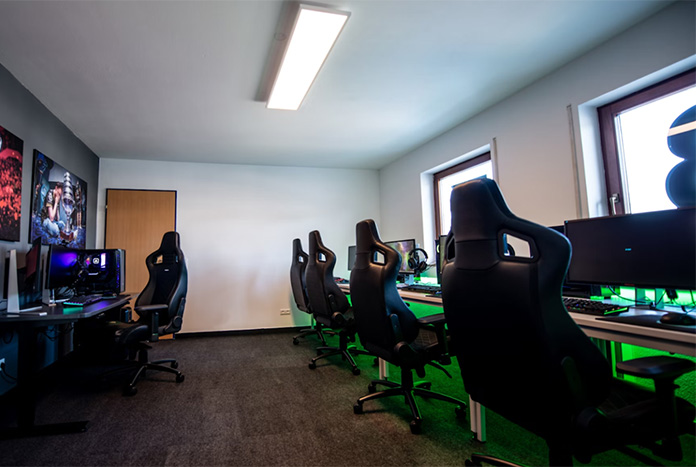
As the gaming world continues to evolve, so does the importance of ergonomics for online gamers. Proper ergonomics not only enhances comfort but also improves performance and reduces the risk of injuries associated with prolonged gaming sessions. This guide provides essential tips on creating an ergonomic setup tailored for online gamers, focusing on key aspects such as chair selection, posture, and workspace arrangement.
1. Choosing the Right Chair
One of the most crucial components of an ergonomic gaming setup is selecting an appropriate chair. An office gaming chair can be a game-changer in this regard. Look for DX Racer chairs that offer comprehensive support, including adjustable lumbar support, seat height, and armrests. A well-designed office gaming chair should promote good posture, support your lower back, and reduce strain on your shoulders and neck. Features such as reclining options and a seat that can be adjusted to suit your sitting position are also beneficial for long gaming sessions.
2. Optimizing Your Desk and Monitor Setup
Desk Height and Position
Ensure that your desk is at a height where your elbows can be comfortably bent at a 90-degree angle while typing or using a mouse. Your forearms should be parallel to the floor or slightly declined. This setup helps prevent shoulder strain and maintains a neutral wrist position.
Monitor Placement
Position your monitor directly in front of you at eye level. The top of the screen should be at or slightly below eye level, and the monitor should be approximately 20 to 30 inches away from your eyes. This setup minimizes neck strain and allows you to maintain a relaxed posture. Adjust the monitor’s tilt to reduce glare and ensure the screen is well-lit to prevent eye strain.
3. Maintaining Proper Posture
Sitting Position
When seated, your back should be fully supported by the chair’s backrest. Sit upright with your shoulders relaxed and your feet flat on the ground or on a footrest. Your thighs should be parallel to the floor, and your knees should be at or slightly below hip level. Avoid slouching or leaning forward, as these positions can lead to back and neck pain over time.
Arm Position
Your arms should be comfortably resting at your sides with your elbows close to your body. The keyboard and mouse should be positioned so that your arms remain at a 90-degree angle. Proper arm positioning helps prevent repetitive strain injuries and allows for smooth, efficient movements.
4. Incorporating Movement and Breaks
Regular Breaks
Even with a well-designed setup, sitting for extended periods can be detrimental to your health. Incorporate the 20-20-20 rule: take a break for 20-second and look at something 20 feet away every 20 minutes. This practice helps reduce eye strain and gives your body a chance to stretch and move.
Stretching and Exercise
Engage in regular stretching and physical activity to counteract the effects of prolonged sitting. Simple stretches for your back, neck, and shoulders can alleviate muscle tension and improve flexibility. Consider incorporating short exercises, such as standing and walking, into your gaming routine to maintain overall physical health.
5. Personalizing Your Gaming Environment
Lighting
Proper lighting is essential to reduce eye strain. Use adjustable lighting in your gaming area to avoid glare on your monitor. Soft, ambient lighting can create a comfortable environment and help reduce the contrast between the screen and your surroundings.
Temperature and Ventilation
Ensure that your gaming space is well-ventilated and maintains a comfortable temperature. Avoid overly warm or cold environments, as they can affect your comfort and concentration. Good ventilation helps keep your gaming area fresh and reduces the risk of discomfort during long sessions.
6. Accessorizing Your Setup
Ergonomic Accessories
Consider investing in ergonomic accessories such as a wrist rest for your keyboard and mouse, an adjustable monitor stand, and a footrest. These accessories can enhance your comfort and contribute to better posture and reduced strain.
Chair Cushions
If your chair does not provide adequate lumbar support, consider using a lumbar cushion. This accessory can help maintain the natural curve of your lower back and improve overall comfort during extended gaming sessions.
7. Listening to Your Body
Finally, pay attention to your body’s signals. If you experience discomfort or pain, it’s essential to address it promptly. Adjust your setup, take breaks, and seek professional advice if needed. Proactively managing any issues can prevent more serious problems and ensure a healthier gaming experience.
Conclusion
Creating an ergonomic gaming setup involves more than just selecting the right chair; it encompasses the entire gaming environment, from desk height to monitor placement. By investing in a DXRacer office gaming chair, maintaining proper posture, and incorporating regular breaks and movement, you can enhance your comfort and performance. Implementing these ergonomic principles will not only improve your gaming experience but also promote long-term health and well-being. Now you get amazing discounts on DX Racer chairs using discount code WEBSPERO.
So, what are waiting for? Shop now!